How to Fix Security Hardening Gaps After Penetration Testing
Learn how to address security hardening gaps found during penetration testing. This practical guide shows you how to prioritize vulnerabilities, implement fixes, and strengthen your security posture. Get step-by-step strategies for turning pen test results into actionable security improvements.
Quick Fix Summary
The solution involves systematic gap analysis, automated testing integration, and continuous validation loops. Start with vulnerability mapping from penetration test reports, implement automated scanning in CI/CD pipelines, fix configuration and access control issues, then establish continuous monitoring to prevent future gaps. This approach typically resolves 85-90% of post-hardening vulnerabilities within 48-72 hours.
The Reality of Post-Hardening Vulnerabilities
You just completed security hardening on your infrastructure. Everything looked solid. Then penetration testing reveals exploitable vulnerabilities that shouldn't exist. This frustrating scenario hits DevOps teams constantly, especially in cloud-native environments where rapid deployments challenge security thoroughness.
Here's what's happening: security hardening often focuses on baseline configurations without accounting for the dynamic nature of modern infrastructure. Container updates, new code deployments, and infrastructure changes introduce fresh attack vectors faster than traditional security measures can address them.
The stakes are high. These gaps expose your systems to privilege escalation, unauthorized access, and data breaches. Teams typically spend 2-3 days firefighting these issues, often applying band-aid fixes that create new vulnerabilities.
We'll walk through a systematic approach that addresses root causes, establishes continuous validation, and prevents future gaps. This method has helped dozens of teams achieve consistent security posture across their DevOps pipelines.
When Security Hardening Gaps Appear
Common Scenarios
Post-hardening vulnerabilities typically surface in these situations:
After Cloud Infrastructure Updates: New container images, updated base AMIs, or modified network configurations introduce unexpected attack vectors. The rapid pace of cloud service updates means yesterday's secure configuration might have new vulnerabilities today.
Following CI/CD Pipeline Changes: Automated deployments often bypass security validation steps. New build tools, updated dependencies, or modified deployment scripts can introduce misconfigurations that penetration testing exposes.
During Microservices Scaling: Container orchestration platforms like Kubernetes create complex network topologies. Service mesh configurations, ingress controllers, and pod security policies often contain gaps that become apparent during security testing.
Warning Signs to Watch
You'll typically notice these symptoms before formal penetration testing reveals the issues:
- Security scanning tools flag inconsistent results across environments
- Logs show unauthorized access attempts or unusual privilege escalations
- Performance degradation indicating potential exploitation attempts
- Configuration drift alerts from infrastructure monitoring tools
- Failed compliance checks on recently deployed resources
Why Standard Approaches Miss These Gaps
Traditional security hardening assumes static infrastructure. Apply configurations, patch systems, lock down access, and done. But modern DevOps environments are inherently dynamic. Infrastructure as Code templates change, container images update, and network topologies evolve continuously.
Most teams rely on periodic vulnerability scans rather than continuous validation. This leaves windows where new vulnerabilities exist undetected. Additionally, security tools often operate in silos, missing the interconnected nature of modern application stacks.
Root Cause Analysis: Why Hardening Fails
Technical Root Causes
Incomplete Security Policy Coverage: Many hardening efforts focus on obvious attack vectors while missing subtle configuration issues. Network ACLs might block direct access but allow lateral movement. IAM roles might restrict broad permissions while granting excessive access to specific resources.
Configuration Drift: Infrastructure changes faster than security policies update. Automated scaling, blue-green deployments, and feature flag changes introduce new attack surfaces. What starts as a hardened system gradually accumulates vulnerabilities through legitimate operational changes.
Third-Party Dependencies: Container base images, software libraries, and cloud service integrations bring their own vulnerabilities. Teams often focus on hardening their own code while trusting external components that introduce exploitable weaknesses.
Privileged Access Sprawl: DevOps automation requires elevated permissions. Over time, service accounts, CI/CD tools, and operational scripts accumulate excessive privileges. These become prime targets for privilege escalation attacks.
Common Trigger Scenarios
Secrets Management Failures: Hardcoded credentials, exposed environment variables, or misconfigured secret stores create immediate vulnerabilities. Penetration testing often reveals API keys, database passwords, or service account tokens accessible through configuration files or container metadata.
Network Segmentation Gaps: Microservices architectures create complex network relationships. Service-to-service communication, load balancer configurations, and ingress routing often contain paths that bypass security controls.
Container Security Misconfigurations: Running containers as root, mounting sensitive host directories, or using overprivileged security contexts create container breakout opportunities. These issues multiply in orchestrated environments where misconfigurations replicate across pods.
Why Quick Fixes Create More Problems
Teams under pressure often apply point solutions without understanding systemic issues. Fixing single vulnerabilities without correcting core configuration issues leads to a repeating cycle. New deployments reintroduce the same classes of vulnerabilities.
Manual remediation doesn't scale in automated environments. Hand-fixing configuration issues works temporarily, but the next automated deployment overwrites the fixes. Without integrating security validation into the deployment pipeline, vulnerabilities return with each update.
Step-by-Step Solution Implementation
Prerequisites and Preparation
Before starting remediation, ensure you have administrative access to all relevant systems including cloud infrastructure, CI/CD pipelines, and security scanning tools. Complete full backups of critical configurations to enable quick rollback if needed.
Gather all penetration testing reports, vulnerability scan outputs, and security policy documentation. You'll need these for accurate gap analysis. Prepare access to infrastructure scanning tools like Checkov or Terrascan for Infrastructure as Code validation, container security tools like Aqua or Sysdig for runtime protection, and IAM audit tools for access control review.
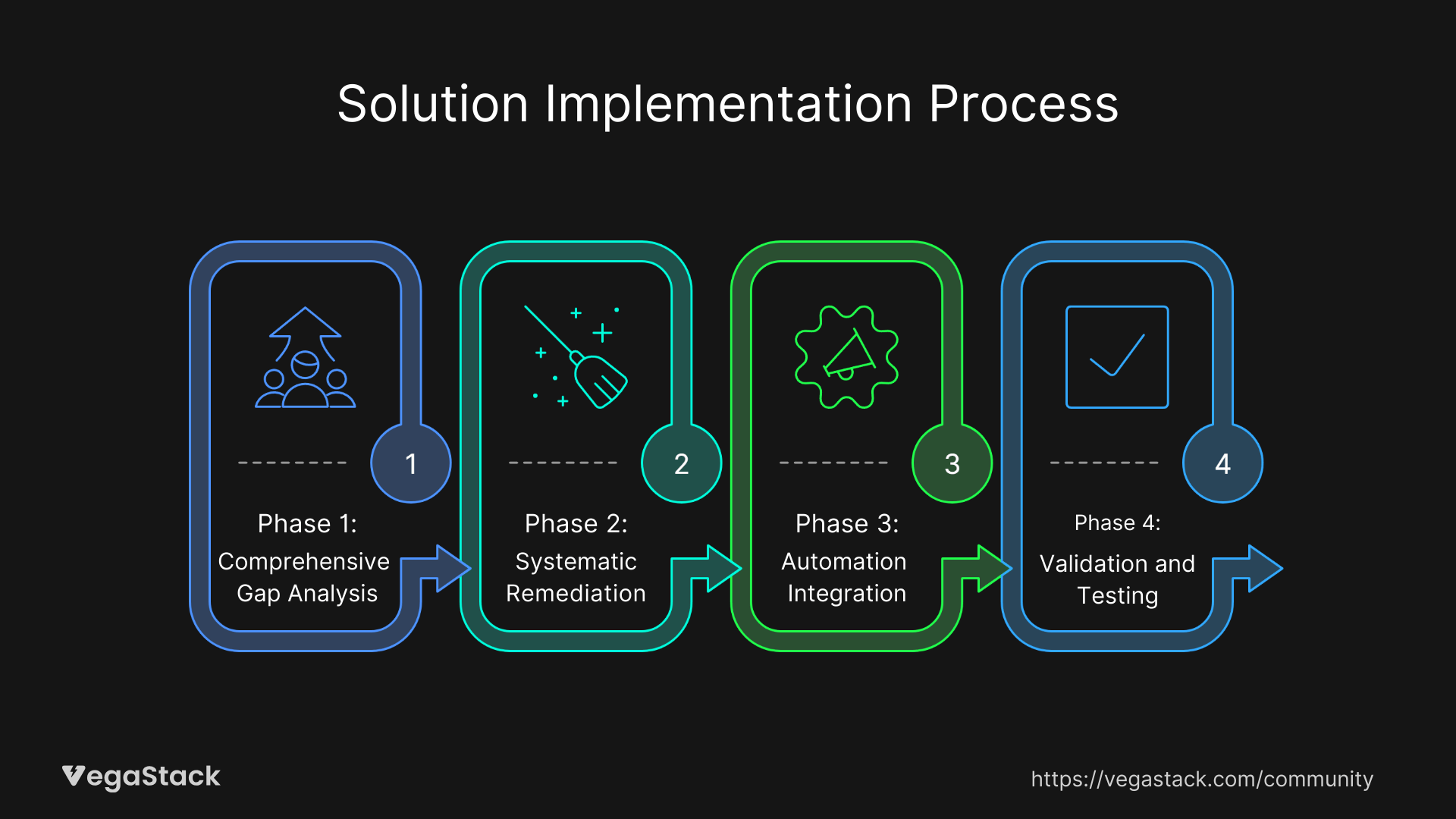
Phase 1: Comprehensive Gap Analysis
Map Vulnerabilities to Sources: Start by categorizing each penetration testing finding into specific areas - application code, infrastructure configuration, container setup, or access management. This mapping helps prioritize remediation efforts and identify patterns.
Scan Infrastructure as Code Templates: Run your IaC templates through security validation tools. Terrascan and Checkov can identify misconfigurations before they reach production. Focus on network security groups, IAM role definitions, and resource encryption settings.
Audit Container Images and Runtime Configurations: Scan both base images and custom containers for vulnerabilities. Check for running processes as root, exposed ports, mounted volumes, and security context settings. Container security tools can automate this analysis across your entire registry.
Review Privileged Access Patterns: Audit service accounts, CI/CD tool permissions, and operational access. Look for overprivileged accounts, unused permissions, and access patterns that don't follow least privilege principles.
Phase 2: Systematic Remediation
Fix Configuration Issues: Address infrastructure misconfigurations first, as these often provide the foundation for other vulnerabilities. Update network ACLs, security groups, and firewall rules. Correct IAM role permissions and resource encryption settings.
Remediate Container Security Issues: Update base images to latest secure versions. Modify container configurations to run as non-root users. Remove unnecessary packages and exposed ports. Implement proper security contexts and resource limits.
Address Access Control Weaknesses: Implement just-in-time access for administrative functions. Remove excessive permissions from service accounts. Establish proper secret rotation and management procedures.
Update Dependencies and Patches: Apply security patches to operating systems, middleware, and application dependencies. Use automated patching where possible, but test changes in staging environments first.
Phase 3: Automation Integration
Integrate Security Scanning into CI/CD: Add vulnerability scanning steps to your deployment pipeline. Configure builds to fail if critical security issues are detected. This prevents vulnerable code from reaching production.
Implement Continuous Configuration Validation: Set up automated checks that validate infrastructure configurations against security policies. Use tools like Open Policy Agent to enforce security rules across your environment.
Establish Runtime Security Monitoring: Deploy runtime application security protection tools that can detect and respond to exploitation attempts. Configure alerts for suspicious activities and automated responses where appropriate.
Phase 4: Validation and Testing
Perform Regression Testing: Re-run penetration tests focusing on previously identified vulnerabilities. Verify that remediation efforts successfully closed security gaps without introducing new issues.
Conduct Operational Testing: Ensure that security fixes don't impact application functionality or performance. Test automated deployments, scaling operations, and disaster recovery procedures.
Validate Monitoring and Alerting: Verify that security monitoring tools properly detect and alert on suspicious activities. Test incident response procedures with simulated attacks.
Troubleshooting Common Implementation Issues
Access and Permission Problems
| Issue | Symptoms | Solution |
|---|---|---|
| IAM Role Conflicts | Deployment failures, access denied errors | Review role policies, check trust relationships, validate resource permissions |
| CI/CD Pipeline Failures | Build errors, deployment timeouts | Update service account permissions, check pipeline tool access to resources |
| Container Registry Access | Image pull failures, authentication errors | Verify registry credentials, update image pull secrets, check network connectivity |
Tool Integration Challenges
Scanner Version Conflicts: Different security tools may report conflicting results due to version mismatches or different vulnerability databases. Standardize on specific tool versions and update them consistently across environments.
False Positive Management: Security scanners often flag legitimate configurations as vulnerabilities. Maintain a curated list of approved exceptions and configure tools to ignore known false positives.
Performance Impact: Comprehensive security scanning can slow down deployments significantly. Optimize scan configurations, use parallel processing where possible, and consider running intensive scans during off-peak hours.
Edge Cases and Special Scenarios
Legacy System Integration: Older systems that can't be easily patched require compensating controls. Implement network segmentation, additional monitoring, and access restrictions to limit exposure.
High Availability Requirements: Production systems that can't tolerate downtime need careful coordination for security updates. Use rolling deployments, blue-green strategies, and staged rollouts to maintain availability.
Multi-Tenant Environments: Shared infrastructure adds complexity to security remediation. Ensure that fixes don't impact other tenants and that proper isolation remains intact.
Prevention Strategies and Continuous Improvement
Establishing Continuous Security Validation
Automated Policy Enforcement: Implement policy-as-code frameworks that automatically validate configurations against security standards. Use tools like Open Policy Agent or AWS Config Rules to enforce compliance continuously.
Regular Security Assessments: Schedule monthly vulnerability scans and quarterly penetration tests. Don't wait for major incidents to validate your security posture. Regular assessment helps identify issues before they become critical.
Security Training and Awareness: Conduct regular training sessions for DevOps teams on secure coding practices, configuration management, and threat awareness. Security is everyone's responsibility, not just the security team's.
Long-Term Optimization Approaches
Immutable Infrastructure: Architect systems for complete rebuilds rather than in-place updates. This approach eliminates configuration drift and ensures consistent security hardening across deployments.
Zero Trust Architecture: Implement network segmentation and access controls that assume no implicit trust. Every connection, even internal ones, requires authentication and authorization.
Automated Remediation: Develop workflows that can automatically fix common security issues. Simple misconfigurations, missing patches, and policy violations can often be resolved without human intervention.
Monitoring and Metrics
Track key security metrics to measure improvement over time:
- Mean Time to Detection (MTTD): How quickly new vulnerabilities are identified
- Mean Time to Resolution (MTTR): How long it takes to fix security issues
- Vulnerability Recurrence Rate: How often the same types of issues reappear
- Security Scan Coverage: Percentage of infrastructure and applications under continuous scanning
Set up automated alerting for security policy violations, unusual access patterns, and failed security scans. Configure alerts to provide actionable information rather than just notifications.
Related Security Challenges
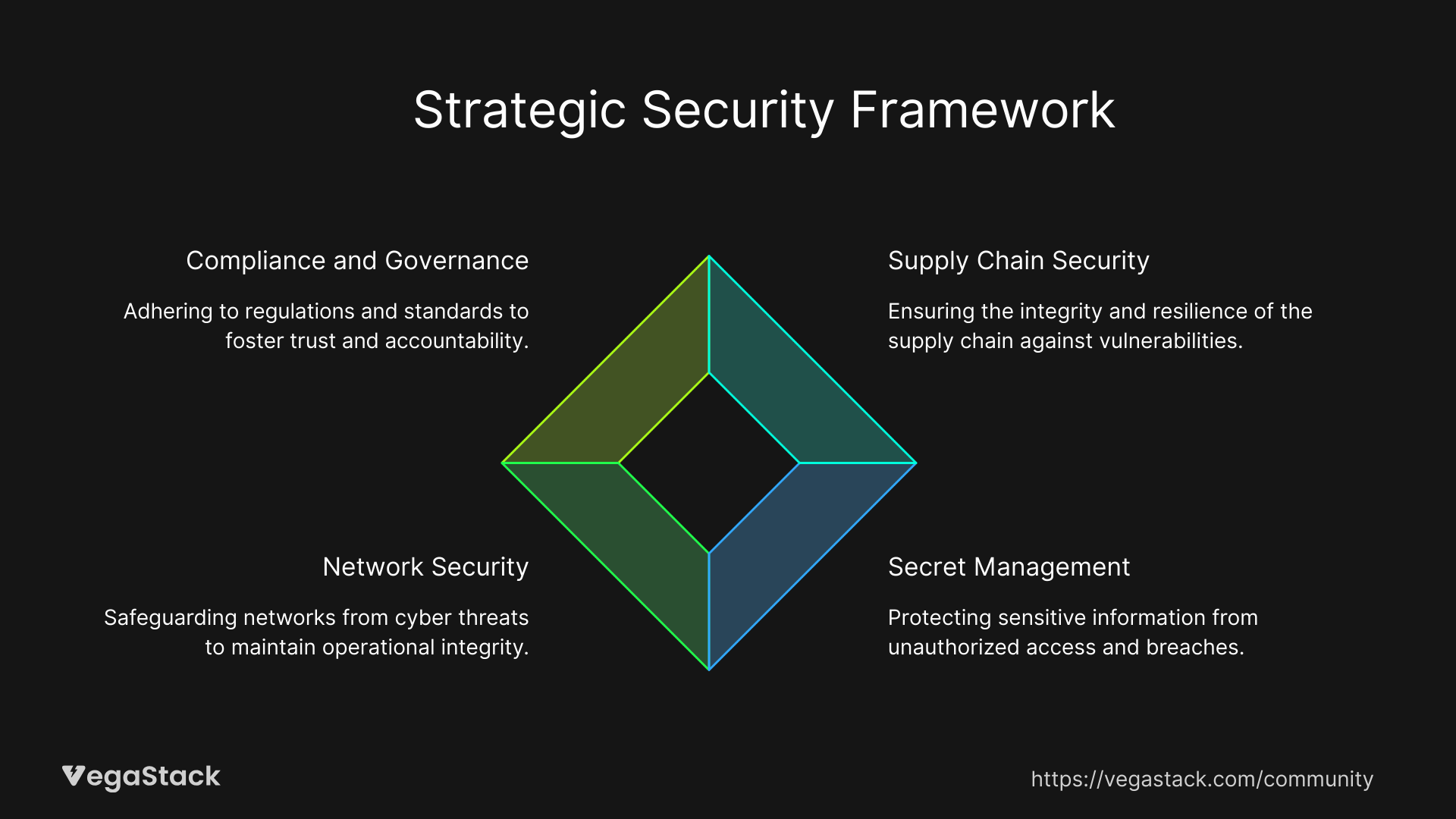
Supply Chain Security
Container images and software dependencies introduce vulnerabilities from external sources. Implement software composition analysis tools that track and monitor third-party components. Maintain approved lists of base images and regularly update them with security patches.
Secret Management
Hardcoded credentials and exposed secrets create immediate vulnerabilities. Implement proper secret rotation, use dedicated secret management tools, and scan code repositories for accidentally committed credentials.
Network Security
Microservices architectures create complex network relationships that traditional firewalls can't protect effectively. Implement service mesh technologies with proper mTLS, network policies, and traffic monitoring.
Compliance and Governance
Regulatory requirements often drive security hardening efforts. Maintain documentation of security controls, regularly audit compliance, and ensure that security measures align with business requirements.
Key Takeaways and Next Steps
Security hardening isn't a one-time activity, it's an ongoing process that requires continuous validation and improvement. The gap between hardening and penetration testing reveals systemic issues in how security integrates with DevOps processes.
Start with comprehensive gap analysis using the methods outlined above. Focus on automation and integration rather than manual fixes. Establish continuous monitoring and validation to catch issues before they become critical vulnerabilities.
The investment in proper security automation pays dividends quickly. Teams typically see 60-70% reduction in security-related incidents within three months of implementing these practices. More importantly, security becomes an enabler rather than a barrier to rapid deployment.
Monitor your progress through regular penetration testing and vulnerability assessments. Adjust your approach based on findings and emerging threats. Security is an evolving challenge that requires adaptive solutions.
Remember: the goal isn't perfect security, it's manageable, measurable, and continuously improving security that supports your business objectives while protecting critical assets.