How to Fix API Gateway Compatibility Issues Breaking Legacy Clients
Learn how to resolve API gateway compatibility issues that break legacy clients. This practical guide covers versioning strategies, backward compatibility techniques, and migration approaches. Get proven solutions for maintaining legacy client support while modernizing your API infrastructure.
Direct Answer
API gateway compatibility issues typically occur when transformation policies change during upgrades, breaking backward compatibility with legacy clients. The fix involves implementing explicit API versioning with version-specific endpoints, updating transformation templates to handle dual payload formats, and configuring gateway routing to segregate legacy and new client traffic. This preserves existing integrations while enabling API evolution.
Introduction
There's nothing worse than deploying an API gateway upgrade only to watch legacy client integrations break across your production environment. One minute everything's running smoothly, the next you're flooded with HTTP 400 errors and angry client developers demanding answers.
This compatibility nightmare strikes teams managing microservices architectures, especially when transformation policies get altered without preserving legacy support. Whether you're running AWS API Gateway, IBM API Gateway, Kong, or another platform, the core challenge remains the same: how do you evolve your APIs without breaking existing client integrations?
The reality is that API gateway compatibility issues are preventable with the right troubleshooting approach. We'll walk through identifying the root causes, implementing version-aware routing, and establishing long-term prevention strategies that keep both legacy and modern clients happy.
Problem Context & Symptoms
When This Problem Occurs
API gateway compatibility issues typically surface during three critical scenarios. First, when upgrading API gateway versions where transformation semantics change, like IBM API Gateway moving from version 10.1 to 10.2 with altered transformation keys. Second, during API version deployments without proper client traffic segregation. Third, when transformation policies get modified without considering backward compatibility requirements.
These issues are especially common in microservices environments where multiple API versions coexist and client upgrade cycles don't align with backend release schedules.
Primary Symptoms
The most obvious indicator is a sudden spike in client-side errors after gateway changes. Legacy clients start receiving unexpected payload formats, triggering JSON schema validation failures. You'll see HTTP 400 Bad Request errors flooding your logs, along with client applications crashing due to missing response fields they've always relied on.
Secondary symptoms include increased support tickets from integration teams, transformation policy logs showing template key mismatches, and performance degradation if retry logic kicks in. Warning signs often appear beforehand, changes to XSLT templates without versioning, missing deprecation notices for schema modifications, or absence of legacy support endpoints.
Impact on Operations
When compatibility breaks, the operational impact spreads quickly. Legacy clients repeatedly fail, creating cascading failures in dependent systems. Support teams get overwhelmed with integration tickets while development teams scramble to identify what changed. The worst part? These issues often surface in production first, when it's too late for easy rollbacks.
Root Cause Analysis
Technical Root Causes
The real issue typically starts with transformation rule changes that aren't backward compatible. For example, IBM API Gateway upgrades often change transformation template keys from generic xsltTransformation to specific requestTransformation and responseTransformation keys. Legacy policies expecting the old keys simply stop working.
Another common culprit is inadequate versioning strategy. When all client traffic routes to the latest API version by default, older clients receive payloads they can't process. This happens when teams assume version headers are always present or rely on implicit versioning that breaks under real-world conditions.
Configuration gaps in gateway transformation logic compound these problems. Teams update templates for new requirements without maintaining dual-version payload support, essentially forcing all clients onto breaking changes simultaneously.
Why Standard Approaches Fail
The biggest mistake teams make is assuming clients will upgrade immediately. This leads to premature retirement of legacy payload formats, leaving older integrations stranded. Another failure point is overlooking transformation policy changes during gateway upgrades, teams focus on infrastructure changes while missing crucial template updates.
Many teams also attempt client-side patches instead of fixing the API layer. This approach doesn't scale and creates technical debt across every client integration. The lack of proper rollback mechanisms in gateway configuration makes recovery difficult when issues surface in production.
Common Trigger Scenarios
Gateway version upgrades are the primary trigger, especially when transformation semantics change between versions. Deployment of new API versions without version-specific routing causes immediate compatibility breaks. Misconfigured version routing rules send legacy clients to incompatible endpoints, while rolling out new features without feature flags forces breaking changes on all clients simultaneously.
Step-by-Step Solution
Prerequisites and Preparation
Before starting the fix, you'll need administrative access to your API gateway configuration and transformation policies. Create complete backups of current gateway policies and transformation templates, you'll want these if rollback becomes necessary.
Set up access to monitoring tools and gateway logs for diagnostics. Document your current legacy client versions and their expected payload formats. Most importantly, establish a test environment that mirrors production transformations and client behavior patterns.
Primary Solution Implementation
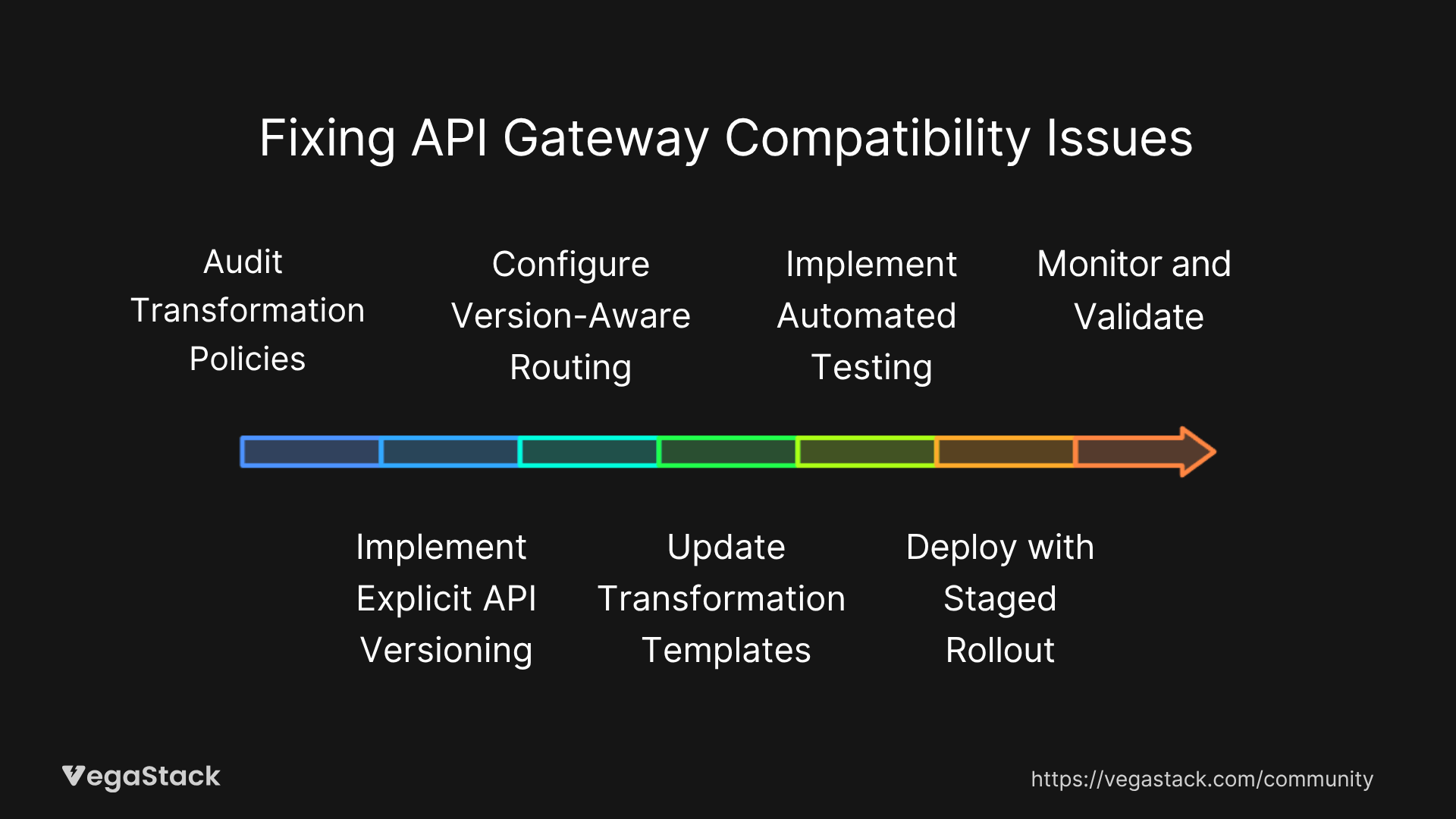
Step 1: Audit Transformation Policies
Start by identifying all transformation policies affected by recent gateway changes. Look specifically for template key changes like xsltTransformation being replaced with requestTransformation or responseTransformation keys. Document every policy that handles request or response transformation for your affected APIs.
Review gateway upgrade logs to identify exactly what transformation semantics changed. This audit typically takes 2-4 hours but provides the foundation for everything that follows.
Step 2: Implement Explicit API Versioning
Create version-specific endpoints to segregate legacy and new clients. Structure these as /v1/, /v2/ paths or use header-based versioning with mandatory version headers. The key is making versioning explicit rather than assuming clients will adapt to changes.
Configure your gateway to recognize version indicators and route traffic accordingly. This prevents the common scenario where legacy clients accidentally hit incompatible API versions.
Step 3: Configure Version-Aware Routing
Set up gateway routing rules that direct legacy client requests to stable, compatibility-preserved endpoints while sending new clients to upgraded versions. This requires mapping client characteristics (user agents, API keys, version headers) to appropriate backend versions.
Test routing logic thoroughly in staging. Verify that requests from known legacy clients reach endpoints with compatible transformation policies.
Step 4: Update Transformation Templates
Modify transformation templates to handle dual payload formats or maintain separate legacy templates alongside new ones. For IBM API Gateway, this means updating templates to use the correct transformation keys while preserving legacy payload structures.
When possible, create transformation logic that can output both old and new formats based on the requesting client version. This approach minimizes template proliferation while maintaining compatibility.
Step 5: Implement Automated Testing
Create test suites that emulate legacy client requests and validate responses against expected schemas. These tests should run automatically as part of your deployment pipeline to catch compatibility breaks before they reach production.
Include edge cases like missing version headers, deprecated authentication methods, and boundary conditions that legacy clients might encounter.
Step 6: Deploy with Staged Rollout
Deploy changes initially in staging environments with comprehensive validation. Use canary deployment strategies to route small percentages of traffic to new configurations while monitoring error rates and performance metrics.
Gradually increase traffic to new versions only after confirming that legacy clients continue functioning correctly. This staged approach typically takes 1-2 weeks depending on API complexity and client diversity.
Step 7: Monitor and Validate
Continuously monitor logs and client error reports during rollout. Set up alerts for increased error rates from legacy clients. Be prepared to quickly rollback to previous stable gateway configurations if unacceptable issues arise.
Track key metrics like response time by client version, error rates segmented by API version, and transformation success rates.
Alternative Solutions
If gateway-level changes prove too risky, consider implementing a middleware service that handles transformation and versioning outside the API gateway. This approach provides more flexibility but adds architectural complexity.
Temporarily disabling transformation policies during critical migration windows can provide breathing room for proper fixes. Feature flags in transformation logic offer another option for controlling breaking changes on a per-client basis.
Troubleshooting Common Issues
Implementation Challenges
Routing Misconfiguration: The most common issue is misconfigured routing that sends legacy clients to incompatible versions anyway. Double-check version detection logic and test with actual legacy client requests. Verify that fallback routing works when version information is missing or malformed.
Template Key Errors: After gateway upgrades, transformation failures often stem from using outdated template keys. Review all XSLT and JSON transformation templates for compatibility with your gateway version. Update key references systematically and test each transformation individually.
Permission Problems: Insufficient permissions can prevent template updates or testing in staging environments. Verify that deployment accounts have appropriate access to modify transformation policies and routing rules.
Edge Cases and Special Scenarios
Stateful Legacy Clients: Some legacy clients require session-pinned routing to maintain state consistency. Configure sticky sessions or implement client-specific routing based on session identifiers.
Multi-tenant Environments: When serving multiple clients with different compatibility requirements, implement client-specific transformation policies. Use API keys or tenant identifiers to determine which transformation rules apply.
Zero-downtime Requirements: High-availability environments need careful deployment sequencing. Use blue-green deployment patterns for gateway configuration changes and maintain multiple active transformation policy sets during transitions.
When Solutions Don't Work
If standard troubleshooting doesn't resolve issues, gather detailed gateway logs and error reports for vendor support engagement. Use distributed tracing tools to isolate exactly where transformation failures occur in your request processing pipeline.
Check for secondary issues like downstream schema validation changes that affect payloads after transformation. Sometimes the problem isn't in the gateway itself but in how transformed payloads interact with backend services that have also evolved.
Prevention Strategies
Establishing Long-term Compatibility
Proactive API Versioning: Implement explicit versioning early in your API lifecycle, before compatibility becomes critical. Use semantic versioning with clear communication about breaking versus non-breaking changes. Document deprecation timelines and maintain multiple supported versions simultaneously.
Continuous Integration Testing: Build backward compatibility validation into your CI/CD pipeline. Test every deployment against simulated legacy client requests. Catch compatibility breaks in development rather than production.
Transformation Template Management: Maintain transformation libraries as code with version control and automated testing. Keep templates modular and well-documented to simplify updates during gateway upgrades.
Monitoring and Early Detection
Set up comprehensive monitoring that tracks request error rates by client version and API version. Implement log queries that detect payload mismatches and transformation exceptions before they impact large numbers of clients.
Key Metrics to Monitor:
- Error rate percentage by client version
- Response time changes after transformation updates
- Schema validation failure rates
- Client retry patterns indicating compatibility issues
Schedule periodic integration health reviews to assess version support strategies and client upgrade progress.
Operational Excellence
Documentation and Communication: Maintain clear API documentation with version-specific examples and migration guides. Communicate breaking changes well in advance with specific timelines for legacy version support.
Rollback Capabilities: Always maintain rollback paths for gateway configurations and transformation policies. Practice rollback procedures in non-production environments to ensure they work under pressure.
Team Coordination: Establish clear processes for coordinating changes between API development, gateway operations, and client integration teams. Breaking changes should never surprise downstream consumers.
Related Issues and Extended Solutions
Connected Compatibility Challenges
API gateway compatibility issues often coincide with broader integration challenges. Schema validation changes in downstream services can break transformed payloads even when gateway transformation works correctly. Client-side SDK incompatibilities with new API versions create additional support burden.
Performance degradation from complex transformation logic impacts user experience and may require optimization of transformation rules or caching strategies.
Advanced Optimization Techniques
Intelligent Routing: Implement machine learning-based client classification to automatically route requests to appropriate API versions based on behavioral patterns rather than explicit version headers.
Automated Compatibility Testing: Use contract testing frameworks to automatically validate API compatibility across multiple client versions during continuous deployment.
Progressive Migration: Design transformation policies that gradually introduce new payload formats while maintaining legacy support, allowing for smoother client migration experiences.
Conclusion and Next Steps
API gateway compatibility issues don't have to derail your deployment schedules or break legacy client integrations. The key is implementing explicit versioning, maintaining transformation template hygiene, and establishing robust testing practices before problems surface in production.
Start by auditing your current transformation policies and implementing version-aware routing for critical client integrations. Build automated compatibility testing into your deployment pipeline to catch issues early. Most importantly, establish clear communication channels with client teams about API evolution and breaking change timelines.
Remember that compatibility is an ongoing operational responsibility, not a one-time fix. Monitor client integration health continuously and maintain multiple supported API versions until legacy clients can migrate safely. With proper planning and implementation, you can evolve your APIs confidently while preserving existing integrations.
The investment in compatibility infrastructure pays dividends in reduced support overhead, improved client relationships, and operational stability during API evolution.