Jenkins vs. GitHub Actions
DevOps teams face a critical decision between Jenkins and GitHub Actions for CI/CD. We tested both platforms across enterprise environments, examining real-world performance, hidden costs, and migration complexities. Compare scalability, cost efficiency, ease of use, and ecosystem integration.
DevOps teams are making a critical decision right now. The old guard Jenkins, trusted by enterprises for over a decade, faces off against GitHub Actions, the modern, cloud-native challenger that's winning over developers worldwide. We've spent months testing both platforms across enterprise environments, and the results might surprise you.
The stakes are high. Your CI/CD choice affects everything from deployment speed to team productivity and infrastructure costs. Pick wrong, and you're stuck with maintenance headaches or vendor lock-in. Pick right, and you unlock faster releases, happier developers, and significant cost savings.
This comparison cuts through the marketing noise. We'll examine real-world performance, hidden costs, and migration complexities based on our hands-on experience with both platforms. Whether you're modernizing legacy pipelines or choosing your first CI/CD solution, you'll know exactly which tool fits your team by the end.
Let's break down what really matters: scalability, cost efficiency, ease of use, and ecosystem integration for enterprise teams evaluating their CI/CD future.
Quick Comparison Overview
Here's the essential breakdown between Jenkins and GitHub Actions for enterprise teams:
| Factor | Jenkins | GitHub Actions |
|---|---|---|
| Hosting Model | Self-hosted only | SaaS + Self-hosted options |
| Setup Time | 2-4 weeks | Same day |
| Monthly Cost | $2,000-8,000 (infrastructure) | $200-2,000 (usage-based) |
| Learning Curve | Steep (Groovy scripting) | Moderate (YAML workflows) |
| Scalability | Manual agent management | Auto-scaling runners |
| Best For | Complex enterprise workflows | GitHub-centric teams |
Jenkins dominates in flexibility and customization. With 1,800+ plugins and Groovy scripting, it handles the most complex CI/CD scenarios. Enterprise teams with legacy systems, strict compliance requirements, and on-premises infrastructure gravitate toward Jenkins for its unlimited customization potential.
GitHub Actions wins on simplicity and integration. Teams already using GitHub repositories get instant CI/CD without additional infrastructure. The YAML-based workflows are easier to manage, and Microsoft's backing provides enterprise-grade reliability with significantly lower operational overhead.
The real decision comes down to control versus convenience. Jenkins gives you complete control but demands significant maintenance resources. GitHub Actions trades some flexibility for dramatic simplicity improvements and reduced operational burden.
Jenkins Deep Dive: The Veteran Platform
Jenkins remains the Swiss Army knife of CI/CD platforms. Born in 2011 and battle-tested across thousands of enterprise environments, it's the tool teams choose when they need unlimited flexibility and don't mind the complexity that comes with it.
Core Strengths and Capabilities
Jenkins shines in complex enterprise scenarios. The plugin ecosystem is massive, over 1,800 plugins covering every conceivable integration from mainframe systems to modern Kubernetes clusters. We've seen teams integrate Jenkins with SAP systems, Oracle databases, and custom internal tools that newer platforms simply can't reach.
The Groovy-based pipeline scripting gives developers programming language flexibility. You can build conditional logic, loops, and dynamic pipeline generation that responds to repository changes or external triggers. For teams managing dozens of microservices with different build requirements, this flexibility is invaluable.
The master/agent architecture scales to handle enormous workloads. Large enterprises run Jenkins instances managing 1,000+ builds daily across distributed agent pools. You control every aspect, from build environments to security policies to artifact storage locations.
Enterprise Integration Excellence
Where Jenkins truly excels is enterprise integration depth. The platform connects to legacy systems that other CI/CD tools ignore. We've implemented Jenkins integrations with COBOL mainframes, custom LDAP directories, and proprietary testing frameworks that enterprises depend on but can't easily replace.
Security customization meets the strictest compliance requirements. Teams configure custom authentication, role-based access controls, and audit logging that satisfies regulatory standards in banking, healthcare, and government sectors. The trade-off is complexity, achieving this security requires dedicated Jenkins administrators.
The Hidden Costs Reality
Jenkins is "free" but expensive to operate. Infrastructure costs for a mid-size team typically run $3,000-6,000 monthly when you factor in server hosting, backup systems, and high-availability configurations. Add dedicated administrator time, usually 0.5-1.0 FTE for teams over 50 developers, and total cost of ownership reaches $8,000-12,000 monthly.
Plugin maintenance creates ongoing overhead. Popular plugins break with Jenkins updates, requiring testing and troubleshooting. We've seen teams spend 10-15 hours monthly just keeping their plugin stack stable and updated.
Ideal Jenkins Use Cases
Jenkins makes sense for specific scenarios. Large enterprises with existing data center infrastructure get the most value. Teams that need deep customization for complex compliance requirements find Jenkins irreplaceable. Organizations with hundreds of legacy applications requiring custom build processes rely on Jenkins' unlimited flexibility.
The platform works best when you have dedicated DevOps engineers who can manage the complexity. Teams without this expertise struggle with Jenkins maintenance and often end up with fragile, poorly configured systems.
GitHub Actions: The Modern Challenger
GitHub Actions represents the new generation of CI/CD platforms. Launched in 2019 with Microsoft's backing, it's designed for teams that want powerful CI/CD without infrastructure headaches. The integration with GitHub repositories is smooth, offering a developer-friendly experience that keeps things simple while still covering all the key features.
Simplicity Meets Power
GitHub Actions eliminates the setup phase entirely. If your code lives in GitHub, you just add a file and you're running CI/CD pipelines within hours. The YAML syntax is straightforward, and GitHub's UI makes pipeline monitoring intuitive for the entire team, not just DevOps specialists.
The GitHub Marketplace offers thousands of pre-built actions. Instead of configuring plugins, you reference community-maintained actions that handle common tasks like Docker builds, AWS deployments, or Slack notifications. These actions are typically more reliable than Jenkins plugins because they're containerized and version-controlled.
Auto-scaling runners solve the infrastructure puzzle. GitHub manages the compute resources, scaling up during busy periods and scaling down during quiet times. Teams pay only for actual usage instead of maintaining idle infrastructure capacity.
Developer Experience Advantages
The learning curve favors GitHub Actions significantly. New team members contribute to pipelines within days instead of weeks. The integration with pull requests, issues, and GitHub's collaboration features creates a unified development experience that Jenkins can't match.
Secrets management is built-in and secure. Repository and organization-level secrets integrate with workflows without additional configuration. The security model follows GitHub's enterprise-grade standards, including audit logging and compliance certifications that enterprises require.
Cost Transparency and Predictability
GitHub Actions pricing is consumption-based and transparent. Small teams often stay within the free tier limits. Growing teams typically spend $200-1,000 monthly on additional runner minutes and storage. Large enterprises might reach $2,000-4,000 monthly, but this includes all infrastructure and platform costs.
The total cost of ownership stays predictable because there's no infrastructure to manage, no dedicated administrators required, and no plugin maintenance overhead. Teams redirect those resources toward feature development instead of CI/CD maintenance.
Modern Workflow Capabilities
GitHub Actions excels at modern development workflows. The event-driven architecture responds to GitHub events like pull requests, releases, or issue comments. Matrix builds test across multiple environments simultaneously. Reusable workflows eliminate duplication across repositories.
The platform integrates naturally with cloud services. Pre-built actions handle deployments to AWS, Azure, Google Cloud, and major hosting platforms. For teams building cloud-native applications, this integration advantage is significant.
GitHub Actions Limitations
The flexibility trade-off is real. Complex pipeline logic that's straightforward in Jenkins becomes challenging in YAML workflows. Teams with highly dynamic build requirements sometimes hit GitHub Actions' structural limitations.
Self-hosted runners are available but require manual scaling and management, similar to Jenkins agents. Teams with specific security or performance requirements might need self-hosted infrastructure, reducing some of GitHub Actions' operational advantages.
Head-to-Head Feature Comparison
The detailed feature comparison reveals where each platform excels and where compromises exist:
| Feature Category | Jenkins | GitHub Actions |
|---|---|---|
| Setup Complexity | Manual installation, server configuration | Zero setup within GitHub |
| Configuration Language | Groovy scripting (powerful but complex) | YAML workflows (simple but limited) |
| Plugin Ecosystem | 1,800+ plugins (maintenance-heavy) | Growing marketplace (containerized) |
| Scalability Model | Manual agent management | Auto-scaling runners |
| Security Management | User-configured (flexible but complex) | Platform-managed (secure by default) |
| Pipeline Flexibility | Unlimited (programming language features) | Good (YAML constraints) |
| Artifact Storage | External configuration required | Built-in with GitHub packages |
| Monitoring & Debugging | Separate dashboards | Integrated GitHub UI |
| Multi-repository Support | Complex shared library setup | Native reusable workflows |
| Compliance Features | Highly customizable | GitHub enterprise standards |
Performance and Reliability
Both platforms handle enterprise workloads effectively, but with different approaches. Jenkins performance depends entirely on your infrastructure investment. Properly configured Jenkins instances with sufficient agent capacity handle massive parallel workloads efficiently.
GitHub Actions performance relies on GitHub's infrastructure. The platform generally delivers consistent performance, but teams have less control over resource allocation. During high-demand periods, queue times can increase, though this rarely affects most teams significantly.
Reliability patterns differ substantially. Jenkins reliability depends on your operational expertise and infrastructure design. Well-managed Jenkins instances achieve excellent uptime, but poorly configured systems create frustrating outages.
GitHub Actions reliability benefits from Microsoft's platform investment. The service level agreements and uptime track record exceed what most teams achieve with self-managed Jenkins instances.
Use Case Scenarios: When to Choose Which Platform
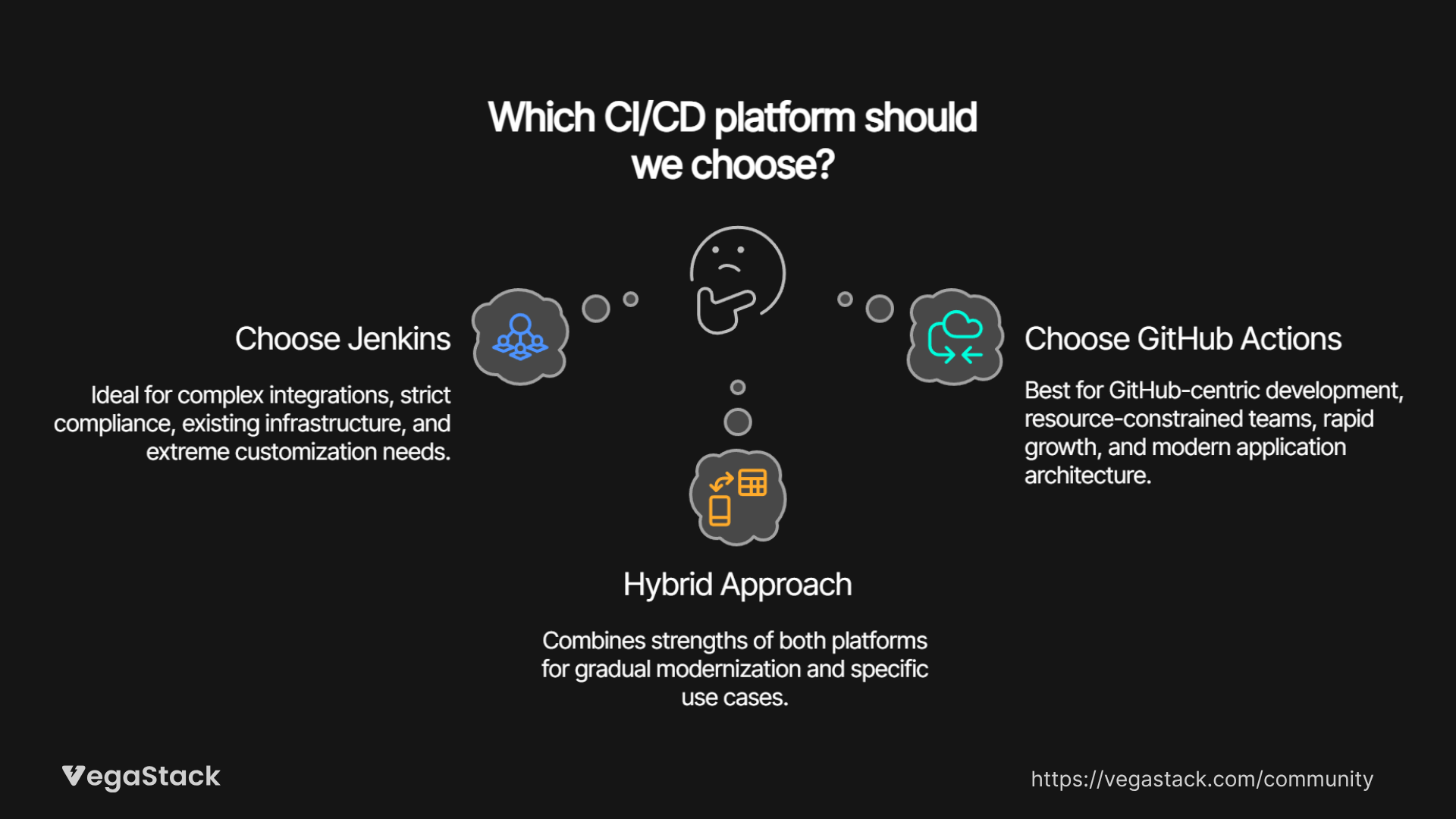
The choice between Jenkins and GitHub Actions depends heavily on your team's specific requirements and constraints.
Choose Jenkins When
Complex Enterprise Integration: Your applications integrate with mainframe systems, legacy databases, or proprietary tools that newer platforms don't support. Jenkins' massive plugin ecosystem covers integration scenarios that GitHub Actions simply can't handle.
Strict Compliance Requirements: Regulated industries with specific audit trails, custom security policies, or air-gapped environments need Jenkins' customization capabilities. The platform adapts to any compliance framework when configured properly.
Existing Infrastructure Investment: Teams with established data center infrastructure, dedicated DevOps staff, and existing Jenkins expertise can leverage their investment. Migration costs might outweigh GitHub Actions benefits in these scenarios.
Extreme Customization Needs: Applications requiring dynamic pipeline generation, complex conditional logic, or integration with dozens of internal systems benefit from Jenkins' programming language flexibility.
Choose GitHub Actions When
GitHub-Centric Development: Teams already using GitHub repositories, pull requests, and issues get immediate value from integrated CI/CD. The unified experience improves developer productivity significantly.
Resource-Constrained Teams: Organizations without dedicated DevOps engineers benefit from GitHub Actions' operational simplicity. The platform requires minimal maintenance and administration overhead.
Rapid Growth Scenarios: Startups and scale-ups need CI/CD that grows automatically with their development velocity. GitHub Actions' auto-scaling and usage-based pricing align with variable demand patterns.
Modern Application Architecture: Cloud-native applications, microservices, and containerized deployments work seamlessly with GitHub Actions' modern workflow patterns and cloud service integrations.
Hybrid Scenarios
Some enterprises use both platforms strategically. Legacy applications remain on Jenkins while new projects adopt GitHub Actions. This approach requires careful coordination but allows gradual modernization without disrupting existing workflows.
Teams might also use Jenkins for complex, scheduled batch processes while handling standard CI/CD workflows through GitHub Actions. The complementary strengths can work together when managed thoughtfully.
Migration and Implementation Considerations
Moving between these platforms involves significant planning and execution effort. We've guided multiple enterprise migrations and learned valuable lessons about what works and what causes problems.
Jenkins to GitHub Actions Migration
The migration path requires careful pipeline translation. Groovy-based Jenkinsfiles don't convert automatically to YAML workflows. Teams need to rebuild pipeline logic using GitHub Actions syntax, which often means simplifying complex conditional logic.
Plugin dependencies create the biggest migration challenge. Each Jenkins plugin requires evaluation to find equivalent GitHub Actions functionality. Some integrations simply don't exist in the Actions ecosystem yet, requiring custom solutions or workflow changes.
The typical migration timeline runs 3-6 months for enterprise teams. Critical applications migrate first to validate the approach, followed by gradual transition of remaining projects. Parallel operation during transition helps manage risk and allows rollback if issues arise.
Implementation Best Practices
Start Small: Both platforms benefit from pilot project approaches. Choose representative applications that demonstrate key workflows without critical path dependencies.
Invest in Training: Jenkins requires dedicated administrator training and ongoing education. GitHub Actions needs developer workflow training but has a gentler learning curve.
Plan for Scale: GitHub Actions scaling is automatic, but cost management requires usage monitoring and optimization. Jenkins scaling needs capacity planning and infrastructure investment.
Security Configuration: Both platforms require security policy definition and implementation. GitHub Actions provides better defaults, but Jenkins offers more granular control options.
The implementation complexity difference is dramatic. GitHub Actions implementations typically complete within 2-4 weeks, while Jenkins implementations often require 2-4 months for full production readiness.
Decision Framework: Making the Right Choice
Your CI/CD platform choice should align with your team's technical requirements, operational constraints, and strategic direction. Here's how to evaluate your specific situation:
Key Evaluation Questions
Infrastructure Preference: Do you want to manage CI/CD infrastructure yourself, or prefer a managed service? This fundamental question often determines the best path forward.
Team Expertise: Does your team include dedicated DevOps engineers with Jenkins experience, or are you primarily application developers who want simple CI/CD integration?
Integration Requirements: Do your applications depend on legacy systems, proprietary tools, or complex enterprise integrations that require extensive customization?
Compliance Constraints: Do regulatory requirements demand specific security configurations, audit trails, or data residency controls that influence platform choice?
Growth Trajectory: Is your development team stable in size, or do you expect significant growth that requires automatic scaling capabilities?
Evaluation Approach
Test both platforms with representative workflows from your environment. The hands-on experience reveals practical differences that specifications can't capture. Focus on your most complex use cases during evaluation, simple scenarios work well on both platforms.
Consider total cost of ownership beyond platform licensing. Include infrastructure, administration, training, and opportunity costs in your analysis. The platform with higher upfront costs might deliver better long-term value when operational overhead is considered.
Evaluate your team's learning curve and productivity impact. The platform that your team adopts quickly and uses effectively provides more value than the theoretically superior option that creates ongoing friction.
Bottom Line: Jenkins vs GitHub Actions
The CI/CD landscape has evolved dramatically, and your choice depends on whether you prioritize flexibility or simplicity.
Jenkins remains the champion for complex enterprise scenarios. If you need unlimited customization, extensive legacy integrations, or have specific compliance requirements that demand deep configuration control, Jenkins delivers unmatched capabilities. The platform excels when you have dedicated DevOps expertise and existing infrastructure investment to leverage.
GitHub Actions wins for modern development teams seeking operational simplicity. The integrated GitHub experience, automatic scaling, and dramatically reduced maintenance overhead make it the clear choice for teams that want powerful CI/CD without infrastructure complexity. The cost predictability and faster time-to-value provide compelling advantages.
The trend favors GitHub Actions for most new implementations. The platform's rapid feature development, growing ecosystem, and Microsoft's enterprise commitment make it increasingly capable while maintaining its simplicity advantages.
For enterprise teams evaluating CI/CD transitions, the decision often comes down to timing and resources. Teams with immediate modernization pressure and limited DevOps resources benefit from GitHub Actions' quick implementation and low operational overhead. Organizations with complex requirements and existing Jenkins expertise might optimize their current platform while planning future migration.