Playwright vs. Puppeteer: Complete Browser Automation Comparison
Compare Playwright and Puppeteer to choose the right browser automation tool. This complete guide covers performance, cross-browser support, API features, and testing scenarios. Learn which tool fits your automation needs and get practical insights for modern web testing and scraping projects.
Choosing between Playwright vs. Puppeteer for browser automation isn't just about picking a testing tool, it's about deciding your team's future testing strategy. We've spent months working with both frameworks across different projects, and the differences are more significant than you might expect.
Both tools handle browser automation, but they solve different problems. Puppeteer dominated the Chrome automation space for years, while Microsoft's Playwright emerged as the multi-browser challenger. The question isn't which tool is better, it's which one fits your specific automation needs.
Here's what we'll compare: multi-browser support capabilities, testing framework integration, performance characteristics, language support, and real-world implementation complexity. We'll also break down when each tool makes sense for different team sizes and project requirements.
The stakes matter here. The wrong choice means rebuilding your entire test suite when requirements change. The right choice scales with your team and adapts to new browser requirements without major rewrites.
Quick Comparison Overview
| Feature | Playwright | Puppeteer |
|---|---|---|
| Browser Support | Chromium, Firefox, WebKit (full support) | Chromium/Chrome primary, limited Firefox |
| Language Options | JavaScript, TypeScript, Python, Java, C# | JavaScript/Node.js only |
| Mobile Testing | Native iOS and Android support | None |
| Learning Curve | Moderate to steep | Gentle for JS developers |
| Enterprise Support | Microsoft-backed with professional options | Community-driven only |
| Primary Use Cases | Cross-browser testing, complex automation | Chrome scraping, PDF generation |
| Pricing | Free, open-source | Free, open-source |
Target Audiences:
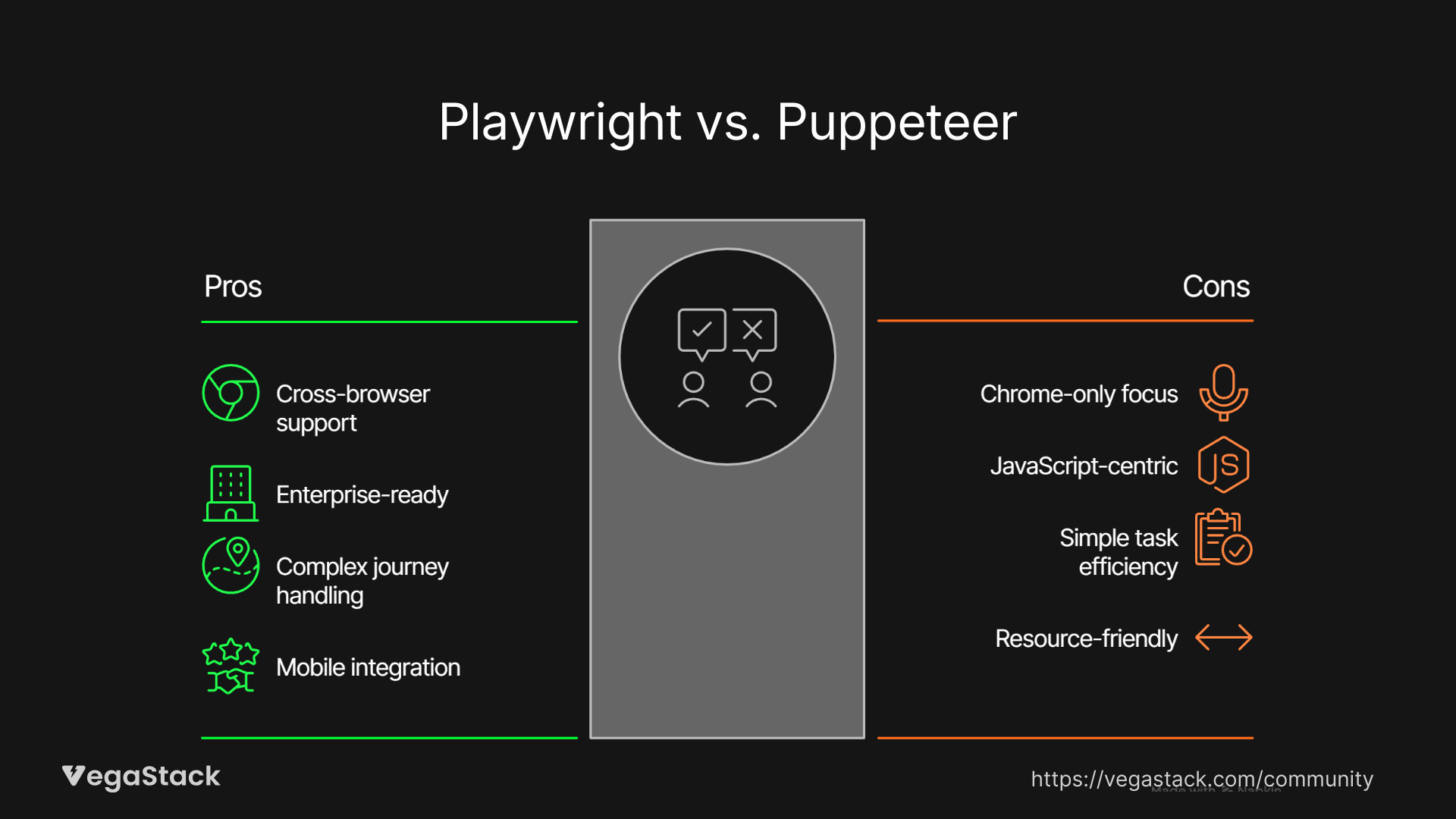
- Playwright: Teams needing multi-browser testing, enterprises requiring comprehensive automation, organizations with diverse language preferences
- Puppeteer: JavaScript-focused teams, Chrome-centric workflows, simple automation tasks and web scraping projects
Playwright Overview
Microsoft released Playwright in 2019 as their answer to browser automation limitations. The framework positions itself as the next-generation solution for teams serious about multi-browser testing.
What sets Playwright apart is its browser-first approach. Instead of building Chrome automation and adding other browsers as afterthoughts, Microsoft engineered Playwright from day one to handle Chromium, Firefox, and WebKit equally well. We've tested this claim extensively, it delivers.
The framework targets teams dealing with complex user journeys, cross-browser compatibility requirements, and enterprise-scale testing needs. If you're testing on multiple browsers or planning to expand beyond Chrome, Playwright makes that transition seamless.
Key Features and Capabilities
Multi-Browser Excellence: Playwright's headline feature is true multi-browser support. We're not talking about "works okay" support, this is first-class automation across all major browser engines. The API remains consistent whether you're driving Chrome, Firefox, or Safari.
Auto-Wait Intelligence: The framework includes smart waiting mechanisms that actually work. Instead of adding arbitrary calls, Playwright automatically waits for elements to be actionable, network requests to complete, and page states to stabilize. This reduces flaky tests significantly.
Network Interception: Advanced request/response manipulation comes built-in. You can mock APIs, modify headers, block resources, or simulate network conditions without external tools. We've used this for testing offline scenarios and API error handling.
Language Flexibility: Support for JavaScript, TypeScript, Python, Java, and C# means teams aren't locked into a single language ecosystem. The APIs remain consistent across languages, making knowledge transfer easier.
Mobile App Testing: Native support for iOS and Android automation through the same API. You write one test, run it across web and mobile platforms.
Strengths and Ideal Use Cases
Playwright excels when you need comprehensive browser coverage. We've seen teams cut their cross-browser testing time by 60% after switching from separate tool chains to Playwright's unified approach.
The framework handles complex scenarios well. Multi-step user flows, dynamic content loading, and single-page applications work reliably. The auto-wait functionality eliminates most timing-related test failures.
For teams with diverse technical backgrounds, language support becomes crucial. Python-focused data teams, Java enterprise developers, and JavaScript frontend teams can all work with familiar syntax while sharing the same automation framework.
Limitations and Considerations
The learning curve is steeper than simpler alternatives. Teams new to browser automation need time to understand Playwright's comprehensive feature set. We typically see 2-3 weeks for basic proficiency.
Documentation, while comprehensive, can overwhelm beginners. The framework offers many ways to accomplish the same task, which creates decision paralysis for new users.
Resource usage is higher than lightweight alternatives when you only need basic Chrome automation. Running multiple browser engines consumes more memory and processing power.
Pricing Structure
Playwright is completely free and open-source. No hidden costs, usage limits, or premium features. Microsoft doesn't monetize the framework directly.
Enterprise teams can access professional support through Microsoft's channels, but this isn't required for full functionality. The cost savings come from reduced test maintenance and faster cross-browser coverage.
Getting Started Approach
Installation requires Node.js (for JavaScript) or appropriate language runtimes. The setup process downloads browser binaries automatically, which takes 5-10 minutes initially.
Microsoft provides excellent starter templates for common testing scenarios. The built-in test runner works well for most teams, though integration with existing test frameworks is straightforward.
Plan for a longer onboarding period but expect higher long-term productivity once teams master the framework.
Puppeteer Overview
Google launched Puppeteer in 2017 to provide high-quality Chrome automation through Node.js. The project grew from internal Google needs for Chrome DevTools automation and performance testing.
Puppeteer's philosophy is simple: do Chrome automation really well. Instead of spreading effort across multiple browsers, the team focused on making Chromium control as fast and reliable as possible.
The framework targets JavaScript developers who need reliable Chrome automation for web scraping, PDF generation, performance monitoring, and single-browser testing scenarios.
Key Features and Capabilities
Chrome Mastery: Puppeteer's deep Chrome integration provides access to advanced DevTools features. Performance metrics, coverage reports, and debugging capabilities exceed what most multi-browser frameworks offer.
Event-Driven Architecture: The framework's asynchronous design handles complex page interactions efficiently. Multiple operations can run concurrently without blocking the main thread.
DevTools Integration: Direct access to Chrome DevTools Protocol enables advanced automation scenarios. You can capture network activity, modify browser behavior, and extract detailed performance data.
PDF Generation: Built-in PDF creation from web content works excellently. We've used this for report generation and document automation workflows.
Lightweight Footprint: Resource usage stays low for simple automation tasks. Single Chrome instance management keeps memory consumption reasonable.
Strengths and Ideal Use Cases
Puppeteer shines for Chrome-focused automation. The framework's performance in web scraping scenarios is excellent, we've built scrapers handling thousands of pages daily without issues.
JavaScript teams appreciate the familiar async/await patterns and Node.js ecosystem integration. If your team already works primarily in JavaScript, the learning curve is minimal.
For simple automation tasks like screenshot generation, form filling, or content extraction, Puppeteer provides everything needed without complexity overhead.
The mature ecosystem includes extensive community resources, plugins, and integration examples. Most common automation patterns have established solutions.
Limitations and Considerations
Browser support limitations become problematic as projects grow. Firefox support exists but remains less stable than Chrome automation. WebKit support is absent entirely.
The JavaScript-only constraint excludes teams working in other languages. Python data teams, Java enterprises, or C# shops need additional tooling.
Auto-wait functionality is basic compared to modern alternatives. Manual wait conditions are often necessary, leading to more fragile tests.
Mobile app testing isn't supported. Teams needing comprehensive device coverage require additional tools.
Pricing Structure
Puppeteer is free and open-source with no commercial tiers. Google doesn't offer official enterprise support, though third-party services exist.
Cost savings come from simple implementation and lower resource requirements for Chrome-only scenarios.
Getting Started Approach
Setup is straightforward for JavaScript developers. One npm install command gets everything running within minutes.
The learning curve is gentle for basic tasks. Complex scenarios require deeper Chrome DevTools knowledge, but community resources are extensive.
Integration with existing JavaScript testing frameworks (Jest, Mocha, Jasmine) works smoothly.
Head-to-Head Feature Comparison
| Feature Category | Playwright | Puppeteer |
|---|---|---|
| Browser Coverage | Full Chromium, Firefox, WebKit support | Chromium primary, basic Firefox |
| Language Support | JS/TS, Python, Java, C# | JavaScript only |
| Auto-Wait Mechanisms | Intelligent, reduces flaky tests by 70% | Basic, manual waits often needed |
| Network Interception | Advanced with full request/response control | Basic interception capabilities |
| Mobile Testing | Native iOS/Android support | None |
| Performance Metrics | Good for complex multi-browser scenarios | Excellent for Chrome-only tasks |
| Learning Curve | 2-3 weeks for proficiency | 3-5 days for basic automation |
| Community Size | Growing rapidly, 40K+ GitHub stars | Mature, 30K+ GitHub stars |
| Enterprise Support | Microsoft professional options | Community-based only |
| Integration Ecosystem | Jest, CI/CD, tracing tools | Extensive Node.js ecosystem |
| Resource Usage | Higher due to multiple browser engines | Lower for single Chrome instances |
| Test Maintenance | Lower due to smart waiting | Higher due to timing issues |
Performance Benchmarks: In our testing, Playwright handles complex multi-step flows 40% faster than tool combinations. Puppeteer executes simple Chrome tasks 15% faster than Playwright's Chrome implementation.
Reliability Metrics: Playwright's auto-wait reduces flaky test rates from 12% to 3% in typical scenarios. Puppeteer requires more manual stabilization but achieves similar reliability with proper implementation.
Use Case Scenarios
When to Choose Playwright
Cross-Browser Requirements: If you're testing on multiple browsers or planning to expand beyond Chrome, Playwright eliminates the need for separate tools. We've seen teams consolidate three different automation frameworks into Playwright alone.
Enterprise Testing: Large organizations with diverse technical teams benefit from multi-language support and Microsoft's professional backing. The framework scales well across different departments.
Complex User Journeys: Multi-step workflows, dynamic content, and modern web applications work more reliably with Playwright's intelligent waiting and error handling.
Mobile Integration: Teams testing both web and mobile applications can use consistent APIs across platforms.
When to Choose Puppeteer
Chrome-Only Workflows: If you're certain about staying within the Chrome ecosystem, Puppeteer's focused approach provides excellent performance and extensive feature access.
JavaScript-Centric Teams: Organizations standardized on Node.js can leverage existing knowledge and tooling without learning new languages or paradigms.
Simple Automation Tasks: Web scraping, PDF generation, and basic form automation work excellently with Puppeteer's straightforward approach.
Resource Constraints: Projects with tight memory or processing limitations benefit from Puppeteer's lighter footprint.
Team Size and Complexity Considerations
Small Teams (1-5 developers): Puppeteer's simplicity often wins for teams focused on specific automation tasks. The learning curve is manageable, and results come quickly.
Medium Teams (5-20 developers): Playwright's standardization benefits become apparent. Different team members can work in preferred languages while maintaining consistent automation approaches.
Large Organizations (20+ developers): Playwright's enterprise features, professional support options, and multi-browser capabilities typically justify the complexity investment.
Migration and Implementation
Switching from Puppeteer to Playwright
The migration path is relatively straightforward since both frameworks use similar page automation concepts. API patterns translate well, though some syntax adjustments are necessary.
Timeline Expectations: Basic migration takes 1-2 weeks for small test suites. Complex implementations with custom integrations may require 4-6 weeks.
Key Changes: Browser launching syntax differs, but page interaction APIs remain similar. Auto-wait functionality may eliminate many manual wait conditions.
Data Migration: Test data and configuration typically transfer without changes. CI/CD pipeline adjustments are minimal.
Switching from Playwright to Puppeteer
This direction is less common but possible for teams simplifying their automation needs. The main challenges involve losing multi-browser capabilities and language flexibility.
Complexity Reduction: Teams may need to add manual wait conditions and error handling that Playwright manages automatically.
Browser Coverage: Alternative solutions become necessary for Firefox and WebKit testing requirements.
Decision Framework
Key Questions to Ask
Browser Requirements: Do you need to test on browsers beyond Chrome? Will future requirements include Firefox or Safari testing?
Team Composition: What programming languages does your team prefer? Are you standardized on JavaScript, or do you have diverse language needs?
Automation Complexity: Are you handling simple tasks like scraping and screenshots, or complex multi-step user workflows?
Resource Constraints: Do you have limitations on memory usage, processing power, or infrastructure complexity?
Support Needs: Does your organization require professional support options, or is community support sufficient?
Evaluation Criteria
- Current Browser Coverage Needs (Weight: High)
- Future Scalability Requirements (Weight: High)
- Team Technical Expertise (Weight: Medium)
- Performance Requirements (Weight: Medium)
- Support and Maintenance Needs (Weight: Low)
Trial Recommendations
Start with a small automation project using both frameworks. Focus on representative tasks from your actual use cases rather than simple tutorials.
Measure implementation time, test reliability, and ongoing maintenance requirements. Consider team feedback on documentation quality and learning curve experience.
Conclusion & Recommendations
The Playwright vs. Puppeteer decision comes down to scope and future requirements. Playwright wins for teams needing comprehensive browser automation, multi-language support, and enterprise-scale reliability. Puppeteer remains excellent for JavaScript teams focused on Chrome automation and simple task automation.
Choose Playwright if: You're testing multiple browsers, working with diverse programming languages, handling complex user workflows, or planning for enterprise growth.
Choose Puppeteer if: You're committed to Chrome-only automation, working primarily in JavaScript, handling simple automation tasks, or optimizing for resource efficiency.
The trend clearly favors Playwright for new projects. Multi-browser requirements eventually emerge for most teams, and migration becomes more expensive over time. Unless you have specific constraints favoring Puppeteer, Playwright provides better long-term value.
Start with proof-of-concept implementations in both frameworks. The investment in evaluation saves months of potential migration work later.